The EchoNET manual
Version 2.2 · ambient firmware for the M-VAVE FM-1 · by Darren Lock
What it is
The EchoNET turns the M-VAVE FM-1 into an ambient instrument. What you play is caught by up to four tape-like loops, which bring it back on their own cycles, each pass a little quieter and darker, so phrases drift apart and slowly wear away.
- Sixteen voices in five families, each with its own colour: the pianos (a modelled piano, an electric piano and a velvet piano); synths and pads (a soft analogue synth, a pad and a string machine); voices and air (a choir, a blooming halo and a glassy aurora); bells and metal (bells, wind chimes, vibes and glass); world and wood (gamelan, kalimba and singing bowl). Each loop can have a voice of its own.
- Eight scene slots: save your own over any of them and name your own scenes on the FM-1.
- A mixer for the four loops: a fader, pan and meter each, with mute and solo; levels for the dry sound, the echo, the reverb and the main out; USB recording of each loop raw or as mixed.
- MORPH lets loops 2–4 change the notes they repeat, by a third, fourth, fifth, sixth, octave, ninth or twelfth, always within the scale; Drift plays slow wandering phrases by itself.
- Echo and reverb from a small room to an infinite shimmer.
- FREEPLAY leaves it to play by itself, a slow ambient piece with a visual show.
- Seventeen visualisers in pastel colours, full screen when left alone.
- MIDI OUT: each loop on its own channel, to play other instruments such as an Ableton Move; over USB, or Bluetooth when you switch it on.

New in 2.2
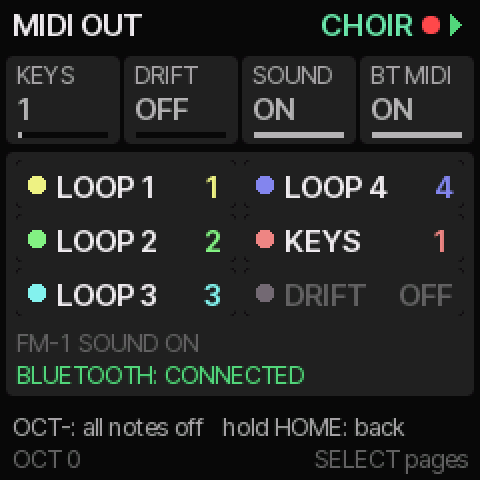
- Bluetooth MIDI, in and out: play The EchoNET from an iPad, iPhone or Mac without a cable, or let it play them. Turn it on at SETTINGS, MIDI OUT's second page, BT MIDI; it is off by default, so the radio stays quiet until you want it.
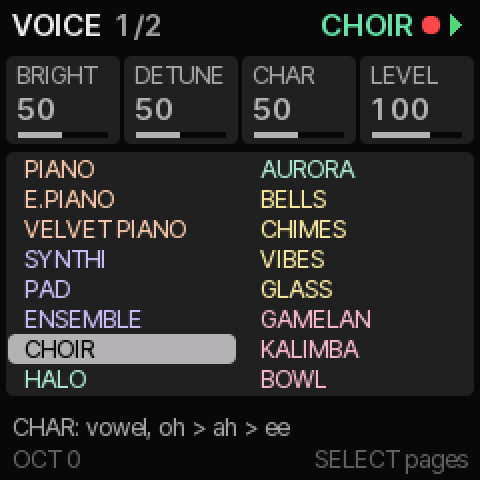
- Voices in families: the VOICES page, the ALGORITHM knob and LOOP VOICES list the sixteen voices with similar instruments together, each family in its own colour: the pianos peach, synths and pads violet, voices and air green, bells and metal gold, world and wood pink.
- Key lights that glow: SETTINGS > LIGHTS adds GLOW, the white keys glowing faintly like a keyboard, and ALL GLOW, every key, for the clearest view.
- TOUCH (velocity from the keys) is now off by default, and when it is on, the top row's seven keys play as loud as the rest.
New in 2.1
- Four pads: ENSEMBLE (a string machine), CHOIR (voices drifting between "ah" and "oh"), HALO (pure tones that bloom) and AURORA (a glassy shimmer). HANDPAN is now called VELVET PIANO.
- A mixer on the loop pages: a fader, meter and pan for each loop, mute and solo, the level of what you play live, and a page for the dry sound, the echo, the reverb and the main out. Scenes keep the levels.
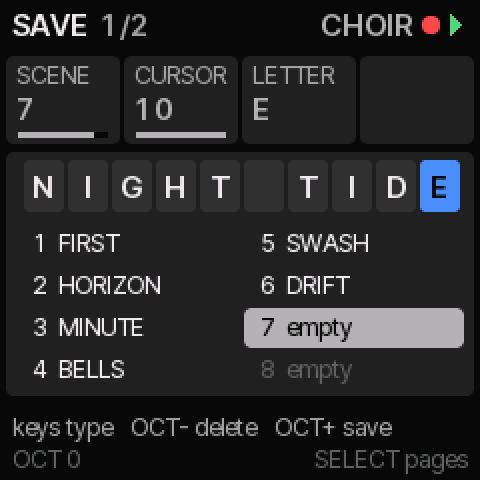
- Name your scenes on the SAVE page, save over the factory ones, clear a slot, or put a factory scene back.
- More MORPH intervals: a third, fourth, sixth, ninth and twelfth, beside the octave and fifth.
- Recording over USB: choose whether each loop's own channel is recorded raw or as the mixer sets it, and whether MIDI OUT follows the mixer's levels.
Installing
From the web page (Chrome or Edge)
- Connect the FM-1 directly to a computer with a USB data cable and switch it on. Unplug any cable from its MIDI IN socket, and close other apps that use MIDI: MIDI arriving during the install can stop it (nothing is written, so just try again).
- Open the installer page in Chrome or Edge and press Install The EchoNET. Allow MIDI when the browser asks.
- Wait about two minutes without unplugging. The FM-1 restarts with The EchoNET's start-up screen.
From a computer, without a browser
Download the-echonet-2.2.fwsc. The command-line installer from fm1-base, tools/fm1_install.py, installs it: python3 tools/fm1_install.py the-echonet-2.2.fwsc (it needs Python 3 with mido and python-rtmidi).
Going back
The installer page can put the official M-VAVE firmware back: download it from M-VAVE and choose its FM-1.fwsc there.
Your scenes and settings carry over: 2.2 reads what every earlier version saved. Since 2.1 they are kept in a more compact form, which 1.0 and 2.0 can't read, so if you go back to 1.0 or 2.0 your saved scenes stay behind.
Backing up your scenes
The backup page (Chrome or Edge, the FM-1 plugged in) saves your scenes, their names and your settings to a file, and puts them back later, onto the same FM-1 or another one. Back up before installing a new version. Restoring needs 2.1 or later.
The EchoNET is free to install, with no warranty: you install it at your own risk.
1Getting Started
The EchoNET is an ambient instrument. What you play is caught by up to four tape loops, which repeat it, a little quieter and darker each time.
First sound
- Play the keys. Recording is on, so the notes go into the loops.
- Listen: each loop brings them back on its own cycle, so the notes slowly drift apart.
- Tap PLAY to stop or start the loops. Hold PLAY to fade out over 10 seconds.
Finding your way
- A section button opens its first page. Tap it again for the next.
- Turn SELECT to step through every page.
- K1 to K4 change the four values shown at the top.
- Turn ALGO to change the voice, from any page.
- OCT- and OCT+ move the keys an octave.
HOME
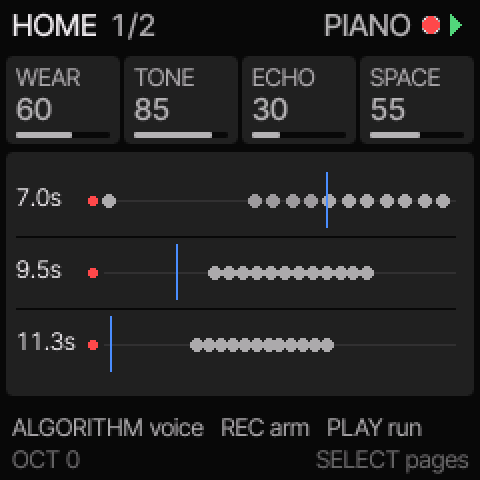
WEAR how long notes last, TONE brightness, ECHO the delay and SPACE the reverb. Tap HOME again for the visualiser.
2Voices
Sixteen voices. Turn ALGO to change the voice you play; notes already sounding finish in theirs. Each loop can have a voice of its own too: see LOOPS AND WEAR.
The sixteen
In families, as the VOICES page shows them (read down the left column, then the right):
- PIANO a modelled piano with long, soft decays.
- E.PIANO an electric piano: a warm body and a tine's ping, growling a little when played hard.
- VELVET PIANO soft, round keys with a long ring: gentler than E.PIANO.
- SYNTHI soft analogue, with a gently resonant filter.
- PAD DX7-style FM.
- ENSEMBLE a string machine: three detuned saws, each slowly wavering.
- CHOIR voices drifting between "ah" and "oh". CHAR moves the vowel.
- HALO a soft glow: pure tones at octaves and fifths, the upper ones blooming in, each swelling on its own. CHAR is how slowly they bloom.
- AURORA a glassy shimmer: the note and its octave, the octave slowly wavering. CHAR is the octave's level.
- BELLS DX7-style FM.
- CHIMES wind chimes, high and long. Each strike may knock a neighbour or two a moment later, in tune: CHAR is how often (0, never).
- VIBES, GLASS, GAMELAN, KALIMBA and BOWL are struck voices.
EDIT VOICE pages
- BRIGHT, DETUNE, CHAR and LEVEL. What CHAR does depends on the voice: the footer says.
- TRANS transposes. TOUCH is how much key velocity matters.
- SPARE voices kept free for new notes. STEREO low notes left, high right.
ENV ENVELOPE
Attack, decay, sustain and release. Each voice reads them its own way, and the page names each knob's job.
3Tone
The tone section shapes everything before the echo and reverb. Tap LFO for its three pages.
FILTER
- MODE off, low-pass, high-pass or band-pass.
- CUTOFF is the same as HOME's TONE.
- RES resonance. SWEEP how far a slow LFO moves the cutoff.
EQ
Low, mid and high bands, from -15 to +15 dB.
SWEEP/EQ
PERIOD the seconds per filter sweep. Then the EQ's band frequencies, and MID Q, how narrow the mid band is.
4Loops And Wear
Four loops catch what you play and repeat it. Each pass wears it a little, as tape does. Tap SEQ for the loop pages.
WEAR
- WEAR how much each pass keeps.
- DARKEN the tone lost each pass.
- WOW tape pitch and timing wobble.
- GAPS repeats that drop out.
LENGTHS
Each loop from 2 to 60 seconds; below 2 it is off. Different lengths keep the notes shifting against each other.
LOOPS
- FADE TO worn notes vanish below this level.
- STEREO how far apart the loops sit.
- TIMING four lengths at once: SHORT, LONG, MINUTE or SWASH.
LOOP VOICES
The fourth page here gives each loop a voice of its own. SAME plays the VOICE page's voice. The loops keep notes, not sound, so a new voice takes over a loop's very next repeat. The lanes show each loop's own voice under its length.
MIXER
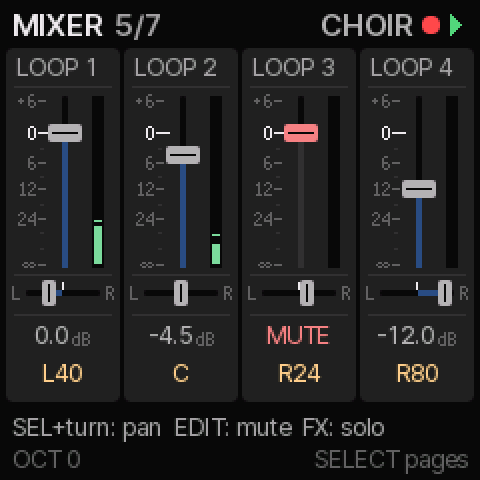
The fifth page is a mixer: a strip for each loop, over its knob.
- Turn a knob: the loop's level, from +6 dB down to OFF. 0 dB plays it as it was.
- Hold SEL and turn: its pan. C leaves it where STEREO puts it.
- Hold EDIT and nudge a knob: mute or unmute that loop, as SEQ + black keys 5-8.
- Hold FX and nudge a knob: solo it; the others go quiet but keep playing and wearing. Again to unsolo. Solo is not kept in a scene.
The meters show each loop as you hear it: green, amber from -6 dB, pink above 0.
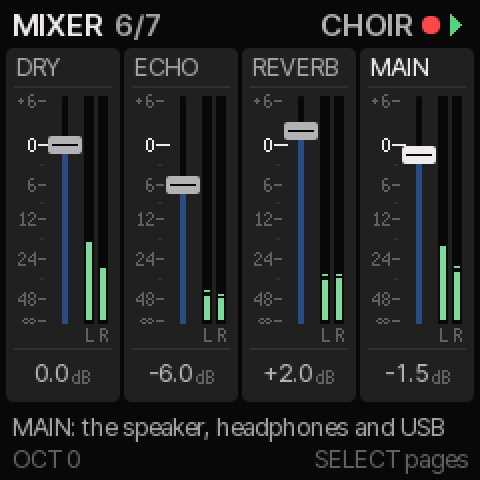
The sixth page is the output: DRY (the voices before the effects), ECHO and REVERB (what each returns) and MAIN (all of it: the speaker, the headphones and USB), each with its left and right meters. 0 dB is as they were. Scenes keep these levels, and the loops'.
The seventh page: LIVE is the level of what you play, MIDI IN and Drift. USB chooses whether recording channels 3-8 are each loop raw (PRE) or as the faders set it (POST); 1 and 2 are always the mix. MIDI V FOLLOW makes a loop's MIDI OUT softer as its fader comes down, and silent when it is soloed out or off.
Hands on
- Tap REC to turn recording on or off.
- Hold SEQ and press black keys 1 to 4: which loops record.
- Hold SEQ and press black keys 5 to 8: mute loops 1 to 4. Muted notes neither play nor wear.
- Hold REC and press a key: erase that pitch.
- Hold REC and press OCT+: clear every loop.
RANDOM
Hold ARP and press OCT- for a new set-up: two to four loops, their lengths, wear and voices, how they MORPH, and the tone, echo and space, all within calm ranges. The notes in the loops stay. Hold SAVE to undo.
5Morph
Loops 2, 3 and 4 can change the notes they repeat, each by its own rule. Loop 1 always plays what you played. Tap SEL twice for MORPH.
Rule
OFF, an interval, SCALE (a note or two along the scale) or RANDOM (anywhere in the scale). The intervals, small to wide: THIRD, FOURTH, FIFTH, SIXTH, OCTAVE, NINTH and 12TH (an octave and a fifth). Each lands on the scale; a third and a sixth are major or minor, as the scale has them.
Direction
UP climbs and starts again, DOWN falls, BOUNCE turns at the edges, RANDOM goes either way.
Chance and range
CHANCE how often a repeat moves. RANGE how many octaves a note may wander.
Mode
- VARY each repeat is a variation: your melody stays underneath.
- EVOLVE moves stay, and the loop slowly rewrites itself.
- OCT+ on a MORPH page puts every note back as played.
6Drift
Drift plays slow, wandering phrases by itself, from notes you choose or from the scale. Tap ARP for its pages.
- OCT+ on a DRIFT page starts and stops it.
- Hold ARP and press keys: add or remove the notes it wanders over.
- Hold ARP and press OCT+: a new seed.
DRIFT 1
RATE seconds per note, DENSITY how many steps sound, PHRASE notes per phrase, REST the silence between.
DRIFT 2
REACH the octaves its phrases span, LEAP how far it jumps, MEMORY how much it repeats itself, NOTE L the note length.
DRIFT 3
DYNAMC how much loudness varies, LINES how many melodic lines, RATIO their speeds, SEED where it starts.
7Scale
One key and scale for Drift, MORPH and the keys. Tap SEL.
- ROOT and SCALE: twelve scales, from the pentatonics to hirajoshi.
- LOCK the keys play only the scale's notes.
- D OCT how many octaves Drift's scale covers.
8Echo And Reverb
FX DELAY
- MODE stereo, panned, ping-pong or dual.
- TIME up to 1 second. FDBK how long the echoes last. ECHO their level, the same as HOME's.
- BRIGHT, LOWCUT and WOBBLE shape the echoes. DUAL and PANNED add a fourth knob.
GLO REVERB
- TYPE loads a room, plate, hall, cathedral, ambient, infinite or shimmer space.
- DECAY, SIZE, and SPACE, its level, the same as HOME's.
- PREDLY, DAMP, SHIMMR, MOD, LOWCUT, SMEAR and WIDTH fine-tune it.
- Hold GLO to freeze the tail. Double-tap GLO to keep it frozen.
9Scenes
A scene keeps every setting, but not the notes in the loops. There are eight slots; the first six hold factory scenes.
- To save: tap SAVE, choose a slot with K1, press OCT+. You can save over a factory scene.
- To name it: turn K2 to move along the name and K3 to pick a letter. Once you start, the keys type too: A is the lowest key, Z the 26th, the top key a space. OCT- deletes. OCT+ saves the sound and the name.
- Hold OCT- on SAVE to put a slot back as it was built: its factory scene and name (slots 7 and 8: empty).
- Hold REC and press OCT- on SAVE to clear a slot: it stays empty, a factory one too, until you save there or hold OCT- to bring its factory scene back.
- To load: tap SAVE twice, choose, press OCT+.
- Or turn PRESETS and press OCT+ within 4 seconds.
- Saved scenes stay through power-off.
Undo
Hold SAVE to undo your last stretch of edits. Hold it again to redo.
10Settings
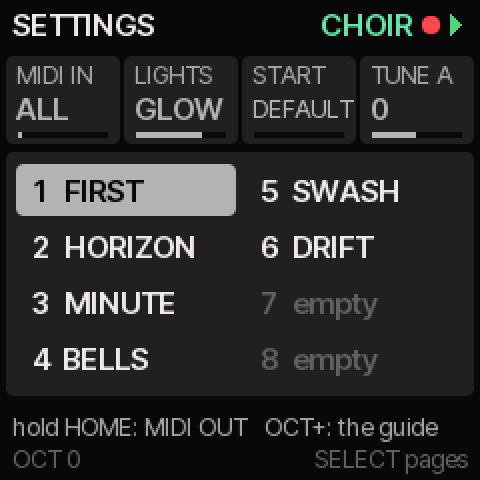
Hold HOME for about a second.
- MIDI IN off, every channel, or one channel. A keyboard's pitch bend (2 semitones) and modulation wheel (vibrato) move the notes you play, not the loops.
- LIGHTS the key lights: on, dim or off. GLOW is on, with the white keys glowing faintly, like a keyboard; ALL GLOW lights the top row too, for the clearest view.
- START a scene to load at power-on.
- TUNE A the pitch of A, 430 to 450 Hz.
MIDI OUT
Hold HOME again for MIDI OUT, and again for its second page. The FM-1 sends over USB, and over Bluetooth while a device is connected.
- LOOP 1 to LOOP 4 each loop's channel, or OFF. Repeats go out as they sound: worn quieter, moved by MORPH.
- KEYS the notes you play.
- DRIFT the notes Drift plays.
- SOUND OFF: the FM-1 is silent and only MIDI plays.
- BT MIDI ON: Bluetooth MIDI, in and out. On an iPad, iPhone or Mac, connect to FM-1 followed by four characters (on an iPad, from a music app's Bluetooth MIDI settings, or Audio MIDI Setup on a Mac). MIDI IN's channel applies to it as to USB. OFF (the default): the radio stays off.
- OCT- here: all notes off.
KEYS
Hold HOME once more for KEYS.
- TOUCH ON: the FM-1's keys play as hard as you press them, and send that velocity. The top seven keys (C#5 to G5) are read through their lights, so they glow faintly and respond more coarsely. OFF (the default): every note at 100.
- CURVE - makes soft playing louder, + needs a harder press for loud notes.
Settings are saved when you leave. OCT+ here opens this guide, at the chapter for the page you came from.
11Visualiser
Tap HOME twice. It follows the sound and the notes, and each note has its own colour, round the circle of fifths.
- STYLE BLOOM, RIPPLES, WAVE, WASH, TIDE, PETALS, STRIPS, KALEIDO, STARS, AURORA, RAIN, LAVA, SHAPES, FIREFLY, SWIRL, SMOKE or RIBBON.
- SWIRL a slow mandala carried outwards in a twist. SMOKE pastel wisps rising and curling. RIBBON the sound traced as a looping line, leaving trails. None of them flash.
- SENS how strongly it reacts.
- FALL how slowly it settles.
- COLOUR from grey to vivid.
Leave it 15 seconds without touching anything and it fills the screen, with its reflection below as in still water. Any button, key or knob brings this page back, and does nothing else (keys still play).
FREEPLAY
OCT+ here starts FREEPLAY: an ambient piece that plays itself, slow and spacious. Drift plays and loop 1 records it. Every minute or so the other loops are dealt again: which record, which rest, their voices, and how they MORPH. The style changes every 30 seconds. Play along on the keys if you like.
- OCT+ again, or HOME, stops it, and the settings go back to how they were. The notes the loops gathered stay.
12Quick Reference
- PLAY tap: run or stop. Hold: fade out.
- REC tap: recording on or off.
- REC with a key: erase that pitch.
- REC with OCT+: clear every loop.
- ARP with OCT-: RANDOM, a new set-up for the loops. Hold SAVE to undo.
- SEQ with black keys 1 to 4: which loops record.
- SEQ with black keys 5 to 8: mute loops.
- ARP with keys: Drift's notes.
- ARP with OCT+: a new Drift seed.
- GLO hold: freeze. Double-tap: keep frozen.
- HOME twice: the visualiser. There, OCT+: FREEPLAY.
- HOME hold: settings. Again: MIDI OUT.
- SAVE hold: undo. Again: redo.
- OCT- with OCT+: octave back to 0.
- ALGO the voice. PRESETS the scenes.
Credits and licences
The EchoNET 2.2 by Darren Lock, made with Claude. Copyright © 2026 Darren Lock. All rights reserved. Free to install and use, with no warranty.
Built on fm1-base (Charles Vestal and others) and felucca-bsp (Leo Kuroshita, Hügelton Instruments, and others), open source under the Mozilla Public License 2.0, with thanks. Their licences and the other parts' (fonts, the JieLi files in the package): licences and notices.
M-VAVE and FM-1 are trademarks of their respective owners. The EchoNET is not affiliated with, endorsed by or supported by M-VAVE, JieLi, Hügelton Instruments or the authors of fm1-base. The EchoNET switches on the FM-1's radio only for Bluetooth MIDI, and only when you turn BT MIDI on.